Choosing how to handle sticky add-to-cart
By RecoverBase ResearchLast reviewed
Watch real stores solve it. Decide. Then read the cited verdict.
On this page
A sticky add-to-cart bar lifts mobile add-to-cart rates when product pages scroll past two screens, mobile sessions exceed 40%, and the product has a single clear call to action.
But it adds UI weight, potentially harming slow pages, confusing complex configurations, or causing layout shifts if not implemented cleanly.
2 independent top-tier sources with verified quotes agree.
- Product page scrolls past two full viewport heights on the target device
- Mobile share of sessions is >40%
- Product has a single clear CTA (not a multi-step configurator)
- Short product pages where the native ATC button stays in view
- Products requiring complex variant selection before adding — the sticky bar adds confusion
- Pages already struggling with Core Web Vitals (CLS, LCP) — add only when implementation is clean
Original RecoverBase data — we captured these stores ourselves, not a third-party figure. Full breakdown is in the table below.
How common is this across real stores?
In our own sample, 2 of 5 stores implement this pattern (sampled ). This is original RecoverBase data, not a third-party figure.
| Observation | Stores | Share of sample |
|---|---|---|
| Implements this pattern | 2 / 5 | 40% |
| Bottom bar (mobile) | 2 / 5 | 40% |
| Does not implement it | 3 / 5 | 60% |
Same decision. Two outcomes.
Real captured screenshots from our sample — each with a live link and what to notice.
Strong examples

Allbirds
Live page (new tab) ↗A sticky bottom bar displays the product name, price, and a 'SELECT A SIZE' call to action.
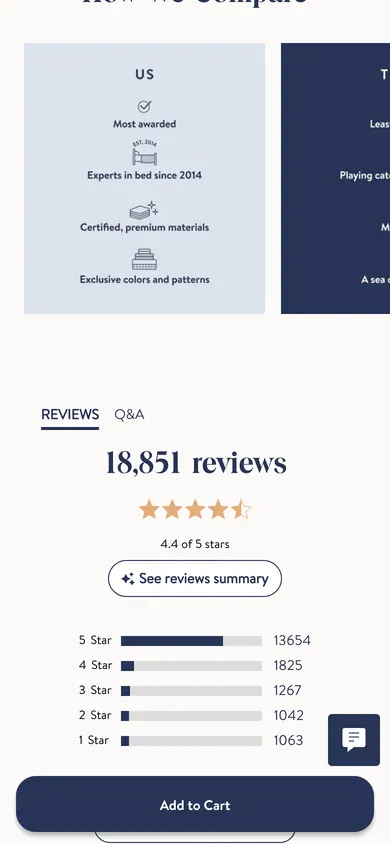
Brooklinen
Live page (new tab) ↗The page features a sticky "Add to Cart" button fixed at the bottom of the screen, visible while scrolling through product details and reviews.
We have not captured a real store doing this badly for this decision yet. Rather than stage a fake counter-example, we leave this slot honest — every example on RecoverBase is a real capture.
In short, should you use sticky add-to-cart?
A sticky add-to-cart bar improves mobile experience on long product pages with simple calls to action, but requires careful implementation to avoid performance issues and user confusion.
Detail & evidence (4)
- A sticky add-to-cart bar lifts mobile add-to-cart rates when product pages scroll past two screens, mobile sessions exceed 40%, and the product has a single clear call to action. But it adds UI weight, potentially harming slow pages, confusing complex configurations, or causing layout shifts if not implemented cleanly.
- A sticky add-to-cart bar may improve add-to-cart rates when product pages scroll past two full viewport heights, mobile sessions exceed 40%, and the product has a single clear call to action.inferred
- Evidence suggests skipping this bar for short product pages where the native add-to-cart button remains visible, or for products requiring complex variant selection, as it may add confusion.inferred
- If pages already struggle with Core Web Vitals, avoid implementation unless a clean approach can prevent layout shifts.inferredweb.dev (Google) (2026)web.dev (Google) (2026)
What does UX research say about sticky add-to-cart?
Sticky add-to-cart bars reduce effort on mobile by being thumb-friendly, but require careful implementation to avoid layout shifts and screen real estate costs.
Detail & evidence (6)
- A bottom-anchored bar on mobile tends to sit closer to the natural thumb zone than a control far up the page. This may reduce effort on long product pages.inferred
- Injecting a sticky add-to-cart bar after initial paint causes layout shift unless space is reserved for it up front.web.dev (Google) (2026)
- An unreserved or late-mounting sticky bar may cause shoppers to click the wrong control at the decisive moment. It can overlap live page content.inferredweb.dev (Google) (2026)
- A persistently pinned bar consumes viewport real estate. Its benefit should outweigh this cost.inferredNielsen Norman Group (2026)
- A pinned element earns its place when it stays unobtrusive, high-contrast, minimally animated, and matches a real user need.Nielsen Norman Group (2026)
- Two out of five sampled stores implement a sticky add-to-cart bar. Both observed variants are bottom bars on mobile.
What are the trade-offs of sticky add-to-cart?
Sticky bars can backfire by delaying interactive time, causing layout shifts, consuming screen real estate, and competing with browser UI.
Detail & evidence (4)
- A sticky bar adds a persistent UI layer. On slow networks, it may delay interactive time, representing a tradeoff between conversion and page weight.inferred
- Dynamically injecting a sticky add-to-cart bar after initial paint causes layout shift. This can lead to shoppers misclicking controls at critical moments.web.dev (Google) (2026)web.dev (Google) (2026)
- A persistently pinned bar consumes viewport real estate. Its benefit should justify this cost.inferredNielsen Norman Group (2026)
- Top-anchored sticky bars tend to compete with the browser UI bar. They are generally worse on mobile compared to bottom-anchored bars, which are more thumb-friendly.inferred
What are the alternatives to sticky add-to-cart?
When a sticky bar is not suitable, rely on standard button placement, avoid adding complexity for variant selection, or prioritize performance optimizations.
Detail & evidence (3)
- For short product pages where the native add-to-cart button remains in view, relying on standard placement may avoid unnecessary screen real estate consumption.inferredNielsen Norman Group (2026)
- When products require complex variant selection, avoiding a sticky bar may prevent confusion. This ensures shoppers complete necessary steps before adding to cart.inferred
- If a page already struggles with Core Web Vitals, prioritizing performance optimization over a sticky bar is often best. Or, ensure implementation reserves exact height in CSS from paint to prevent layout shifts.inferredweb.dev (Google) (2026)web.dev (Google) (2026)
This pattern is not universally good. Each mode below names the trigger and the mechanism that makes it fail — check your own case before shipping it.
Skip when
Short product pages where the native ATC button stays in view
Skip when
Products requiring complex variant selection before adding — the sticky bar adds confusion
Skip when
Pages already struggling with Core Web Vitals (CLS, LCP) — add only when implementation is clean
Conversion vs. page weight
A sticky bar adds a persistent UI layer; on slow networks, it can delay interactive time. Implement as a thin fixed bar with minimal JS.
Bottom vs. top anchor
Bottom-anchored is thumb-friendly on mobile. Top-anchored competes with the browser UI bar and is generally worse on mobile.
A sticky add-to-cart bar lifts mobile add-to-cart rates when product pages scroll past two screens, mobile sessions exceed 40%, and the product has a single clear call to action. But it adds UI weight, potentially harming slow pages, confusing complex configurations, or causing layout shifts if not implemented cleanly.
Sources & how to cite this
Use this in a deck, a paper, or an internal doc — it is built to be cited.
RecoverBase. "Choosing how to handle sticky add-to-cart." 2026. https://recoverbase.com/decisions/sticky-add-to-cart
Originally published by RecoverBase — citation required.
The prevalence sample and annotated examples on this page are original RecoverBase data, licensed CC BY 4.0. Reuse is welcome with attribution; bulk copying or misattribution is not.
- web.dev (Google) · 2026
A sticky add-to-cart bar injected after initial paint is exactly the kind of dynA sticky add-to-cart bar injected after initial paint is exactly the kind of dynamically added element that causes layout shift unless space is reserved for it up front. - web.dev (Google) · 2026
Because the sticky bar overlaps live page content, an unreserved or late-mountinBecause the sticky bar overlaps live page content, an unreserved or late-mounting bar can make shoppers click the wrong control at the decisive moment. - Nielsen Norman Group · 2026
A persistently pinned bar is not free: it permanently consumes viewport real estA persistently pinned bar is not free: it permanently consumes viewport real estate on every page it appears on, so its benefit must clearly outweigh that cost. - Nielsen Norman Group · 2026
A pinned element earns its place only when it stays unobtrusive, high-contrast, A pinned element earns its place only when it stays unobtrusive, high-contrast, minimally animated, and matched to a real user need — the design constraints for a sticky add-to-cart bar.
Zoom out
See every decision for this part of the store on the Product page topic hub.